Permissions and access control
Protect sensitive information while enabling collaboration. BlueDocs provides enterprise-grade access control that's powerful enough for complex organizations and simple enough to configure in minutes.
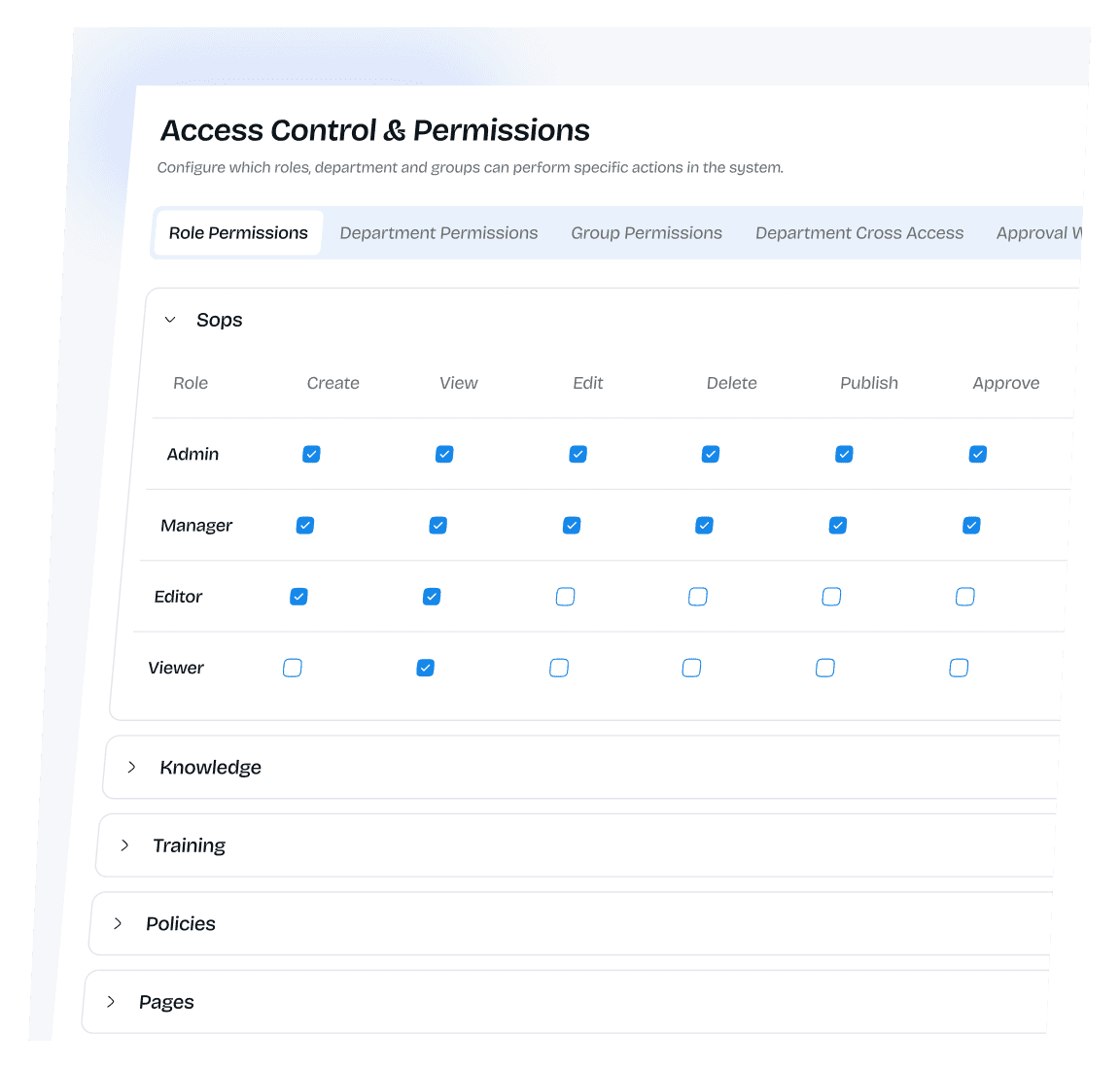







Access control that balances security and usability
Access control that balances security and usability
BlueDocs permissions and access control are designed for organizations that need more than "view" or "edit" toggles. Control who can see, create, edit, delete, publish, approve, and assign documents with granular precision. Scale from simple role-based access to complex department hierarchies and cross-functional team permissions.
BlueDocs permissions and access control are designed for organizations that need more than "view" or "edit" toggles. Control who can see, create, edit, delete, publish, approve, and assign documents with granular precision. Scale from simple role-based access to complex department hierarchies and cross-functional team permissions.
" width="28.99999967065686px"><path d="M 7.253 0 C 3.971 -0.001 1.097 2.203 0.248 5.374 C -0.602 8.544 0.785 11.89 3.628 13.53 L 3.628 22.972 C 3.628 24.158 3.628 24.75 3.848 25.284 C 4.069 25.816 4.489 26.235 5.327 27.074 L 7.253 29 L 10.309 25.943 C 10.45 25.803 10.521 25.732 10.579 25.655 C 10.733 25.454 10.831 25.217 10.865 24.966 C 10.878 24.87 10.878 24.77 10.878 24.572 C 10.878 24.411 10.878 24.33 10.869 24.251 C 10.847 24.046 10.78 23.848 10.675 23.67 C 10.618 23.58 10.556 23.492 10.489 23.409 L 8.703 21.025 L 9.718 19.672 C 10.292 18.905 10.581 18.522 10.729 18.076 C 10.878 17.629 10.878 17.151 10.878 16.191 L 10.878 13.53 C 13.721 11.89 15.107 8.544 14.258 5.374 C 13.409 2.203 10.535 -0.001 7.253 0 Z" fill="transparent" height="29px" id="T1xS2X2Q0" stroke-dasharray="" stroke-linecap="butt" stroke-linejoin="round" stroke-width="2.17" stroke="rgb(13, 20, 26)" width="14.505700490119002px"/><path d="M 0 0 L 0.013 0" fill="transparent" height="1px" id="GIFhgzlc9" stroke-dasharray="" stroke-linecap="round" stroke-linejoin="round" stroke-width="2.9" stroke="rgb(13, 20, 26)" transform="translate(7.25 7.25)" width="1px"/><path d="M 0 13.05 L 8.7 13.05 C 10.051 13.05 10.727 13.05 11.259 13.27 C 11.97 13.565 12.535 14.13 12.83 14.841 C 13.05 15.373 13.05 16.049 13.05 17.4 C 13.05 18.751 13.05 19.427 12.83 19.959 C 12.535 20.67 11.97 21.235 11.259 21.53 C 10.727 21.75 10.051 21.75 8.7 21.75 L 0 21.75 M 2.9 0 L 8.7 0 C 10.051 0 10.727 0 11.259 0.22 C 11.97 0.515 12.535 1.08 12.83 1.791 C 13.05 2.323 13.05 2.999 13.05 4.35 C 13.05 5.701 13.05 6.377 12.83 6.909 C 12.535 7.62 11.97 8.185 11.259 8.48 C 10.727 8.7 10.051 8.7 8.7 8.7 L 2.9 8.7" fill="transparent" height="21.750000090074604px" id="q2OCq_YJW" stroke-dasharray="" stroke-linecap="round" stroke-linejoin="miter" stroke-miterlimit="10" stroke-width="2.17" stroke="rgb(13, 20, 26)" transform="translate(15.95 4.35)" width="13.049999861391722px"/></g></svg>)
Role-based access control
Four-tier role system provides the right level of access for every team member. Admins, Managers, Editors, and Viewers with customizable permissions for different document types.
Role-based access control
Four-tier role system provides the right level of access for every team member. Admins, Managers, Editors, and Viewers with customizable permissions for different document types.
Role-based access control
Four-tier role system provides the right level of access for every team member. Admins, Managers, Editors, and Viewers with customizable permissions for different document types.
Role-based access control
Four-tier role system provides the right level of access for every team member. Admins, Managers, Editors, and Viewers with customizable permissions for different document types.
" width="28.99999885559082px"><path d="M 5.8 2.9 C 5.8 4.502 4.502 5.8 2.9 5.8 C 1.298 5.8 0 4.502 0 2.9 C 0 1.298 1.298 0 2.9 0 C 4.502 0 5.8 1.298 5.8 2.9 Z M 29 2.9 C 29 4.502 27.702 5.8 26.1 5.8 C 24.498 5.8 23.2 4.502 23.2 2.9 C 23.2 1.298 24.498 0 26.1 0 C 27.702 0 29 1.298 29 2.9 Z M 29 26.1 C 29 27.702 27.702 29 26.1 29 C 24.498 29 23.2 27.702 23.2 26.1 C 23.2 24.498 24.498 23.2 26.1 23.2 C 27.702 23.2 29 24.498 29 26.1 Z M 5.8 26.1 C 5.8 27.702 4.502 29 2.9 29 C 1.298 29 0 27.702 0 26.1 C 0 24.498 1.298 23.2 2.9 23.2 C 4.502 23.2 5.8 24.498 5.8 26.1 Z" fill="transparent" height="28.99999885559082px" id="QJxjUVOcu" stroke-dasharray="" stroke-linecap="butt" stroke-linejoin="miter" stroke-miterlimit="10" stroke-width="2.17" stroke="rgb(13, 20, 26)" width="28.99999885559082px"/><path d="M 13.05 2.175 C 13.05 1.499 13.05 1.161 12.94 0.895 C 12.792 0.54 12.51 0.258 12.155 0.112 C 11.889 0 11.551 0 10.875 0 L 2.175 0 C 1.499 0 1.161 0 0.895 0.11 C 0.54 0.258 0.258 0.54 0.112 0.895 C 0 1.161 0 1.499 0 2.175 C 0 2.851 0 3.189 0.11 3.455 C 0.258 3.81 0.54 4.092 0.895 4.238 C 1.161 4.35 1.499 4.35 2.175 4.35 L 10.875 4.35 C 11.551 4.35 11.889 4.35 12.155 4.24 C 12.51 4.092 12.792 3.81 12.938 3.455 C 13.05 3.189 13.05 2.851 13.05 2.175 Z M 13.05 10.875 C 13.05 10.199 13.05 9.861 12.94 9.595 C 12.792 9.24 12.51 8.958 12.155 8.812 C 11.889 8.7 11.551 8.7 10.875 8.7 L 2.175 8.7 C 1.499 8.7 1.161 8.7 0.895 8.81 C 0.54 8.958 0.258 9.24 0.112 9.595 C 0 9.861 0 10.199 0 10.875 C 0 11.551 0 11.889 0.11 12.155 C 0.258 12.51 0.54 12.792 0.895 12.938 C 1.161 13.05 1.499 13.05 2.175 13.05 L 10.875 13.05 C 11.551 13.05 11.889 13.05 12.155 12.94 C 12.51 12.792 12.792 12.51 12.938 12.155 C 13.05 11.889 13.05 11.551 13.05 10.875 Z" fill="transparent" height="13.049999809265138px" id="IMGw8jeAf" stroke-dasharray="" stroke-linecap="round" stroke-linejoin="round" stroke-width="2.17" stroke="rgb(13, 20, 26)" transform="translate(7.975 7.975)" width="13.049999952316284px"/></g></svg>)
Department and group permissions
Structure access based on organizational hierarchy or create flexible groups for projects and committees. Automatic access based on where people work or what teams they join.
Department and group permissions
Structure access based on organizational hierarchy or create flexible groups for projects and committees. Automatic access based on where people work or what teams they join.
Department and group permissions
Structure access based on organizational hierarchy or create flexible groups for projects and committees. Automatic access based on where people work or what teams they join.
" width="29px"><path d="M 28.339 8.765 C 28.78 9.383 29 9.693 29 10.15 C 29 10.608 28.78 10.917 28.339 11.535 C 26.358 14.313 21.299 20.3 14.5 20.3 C 7.7 20.3 2.642 14.311 0.661 11.535 C 0.22 10.917 0 10.607 0 10.15 C 0 9.692 0.22 9.383 0.661 8.765 C 2.642 5.987 7.701 0 14.5 0 C 21.3 0 26.358 5.988 28.339 8.765 Z" fill="transparent" height="20.3px" id="dLkRaS4Y3" stroke-dasharray="" stroke-linecap="butt" stroke-linejoin="miter" stroke-miterlimit="10" stroke-width="2.17" stroke="rgb(13, 20, 26)" width="29px"/><path d="M 8.7 4.35 C 8.7 1.948 6.752 0 4.35 0 C 1.948 0 0 1.948 0 4.35 C 0 6.752 1.948 8.7 4.35 8.7 C 6.752 8.7 8.7 6.752 8.7 4.35 Z" fill="transparent" height="8.7px" id="PnC7dZR_j" stroke-dasharray="" stroke-linecap="butt" stroke-linejoin="miter" stroke-miterlimit="10" stroke-width="2.17" stroke="rgb(13, 20, 26)" transform="translate(10.15 5.8)" width="8.699999999999998px"/></g></svg>)
Document-level visibility
Control access to specific documents, folders, or entire categories. Public documents for everyone, restricted content for leadership, department-specific materials for relevant teams.
Document-level visibility
Control access to specific documents, folders, or entire categories. Public documents for everyone, restricted content for leadership, department-specific materials for relevant teams.
Document-level visibility
Control access to specific documents, folders, or entire categories. Public documents for everyone, restricted content for leadership, department-specific materials for relevant teams.
Document-level visibility
Control access to specific documents, folders, or entire categories. Public documents for everyone, restricted content for leadership, department-specific materials for relevant teams.
" width="29.00000013950015px"><path d="M 18.81 7.27 C 18.81 7.27 19.534 7.994 20.259 9.443 C 20.259 9.443 22.561 5.821 24.605 5.097 M 11.582 0.033 C 7.962 -0.119 5.166 0.297 5.166 0.297 C 3.4 0.423 0.016 1.413 0.016 7.194 C 0.016 12.927 -0.02 19.994 0.016 22.811 C 0.016 24.532 1.082 28.548 4.771 28.763 C 9.254 29.023 17.331 29.08 21.035 28.763 C 22.028 28.706 25.331 27.928 25.748 24.335 C 26.181 20.612 26.096 18.026 26.096 17.411" fill="transparent" height="28.979835619459273px" id="BnNW01YRn" stroke-dasharray="" stroke-linecap="round" stroke-linejoin="round" stroke-width="2.17" stroke="rgb(13, 20, 26)" width="26.102369449738845px"/><path d="M 21.757 7.243 C 21.757 11.243 18.511 14.487 14.506 14.487 C 12.584 14.488 10.74 13.726 9.38 12.367 C 8.02 11.009 7.256 9.166 7.255 7.243 C 7.255 3.242 10.5 0 14.506 0 C 16.428 -0.001 18.272 0.761 19.632 2.12 C 20.991 3.478 21.756 5.321 21.757 7.243 Z M 0 15.936 L 5.795 15.936 M 0 21.73 L 11.59 21.73" fill="transparent" height="21.730443954467773px" id="vzJcXlcD4" stroke-dasharray="" stroke-linecap="round" stroke-linejoin="miter" stroke-miterlimit="10" stroke-width="2.17" stroke="rgb(13, 20, 26)" transform="translate(7.243 0)" width="21.756518980289943px"/></g></svg>)
Approval workflows
Built-in approval routing ensures sensitive content is reviewed before publication. Role-based or group-based approval authority with complete audit trails.
Approval workflows
Built-in approval routing ensures sensitive content is reviewed before publication. Role-based or group-based approval authority with complete audit trails.
Approval workflows
Built-in approval routing ensures sensitive content is reviewed before publication. Role-based or group-based approval authority with complete audit trails.
Approval workflows
Built-in approval routing ensures sensitive content is reviewed before publication. Role-based or group-based approval authority with complete audit trails.
Access control features
Access Control Features control, and comply effortlessly.
Access Control Features control, and comply effortlessly.
Role-Based Permissions
Granular Document
Department-Based
Group-Based
Document and Folder Visibility
Approval Workflows and Authority
Inheritance and Hierarchy
External and Guest
Security and Audit
Four-tier role system
Clear hierarchy that covers most organizational needs without complexity. Admin, Manager, Editor, and Viewer roles with distinct capabilities.
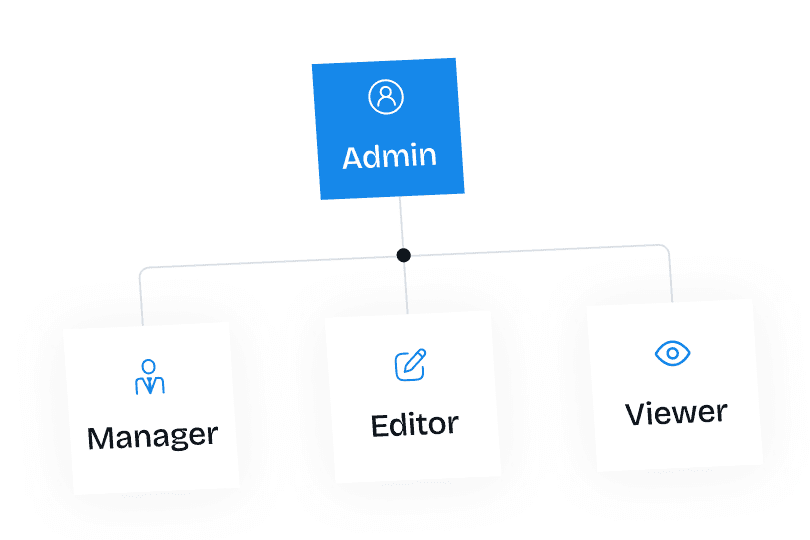
Admin role
Complete control over the organization including user management, permission configuration, system settings, and all document operations. Full visibility across all content.
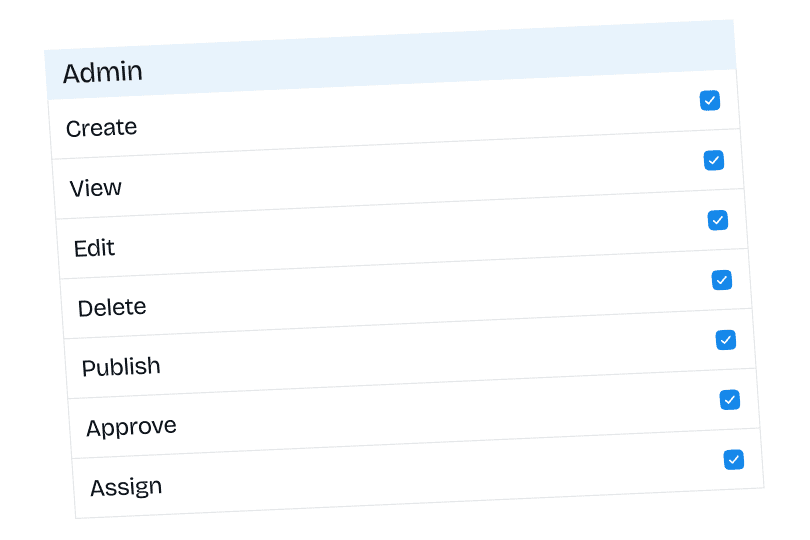
Manager role
Oversee content within their areas of responsibility. Assign documents, approve changes, manage team workflows, and access analytics. Cannot modify system-level settings.
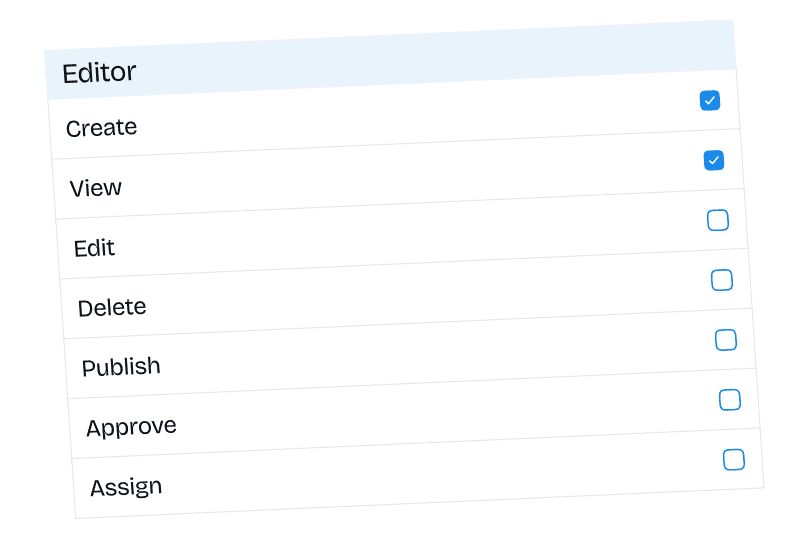
Editor role
Create and edit content across document types with controlled publishing rights. Build documentation, training, and policies with appropriate oversight.
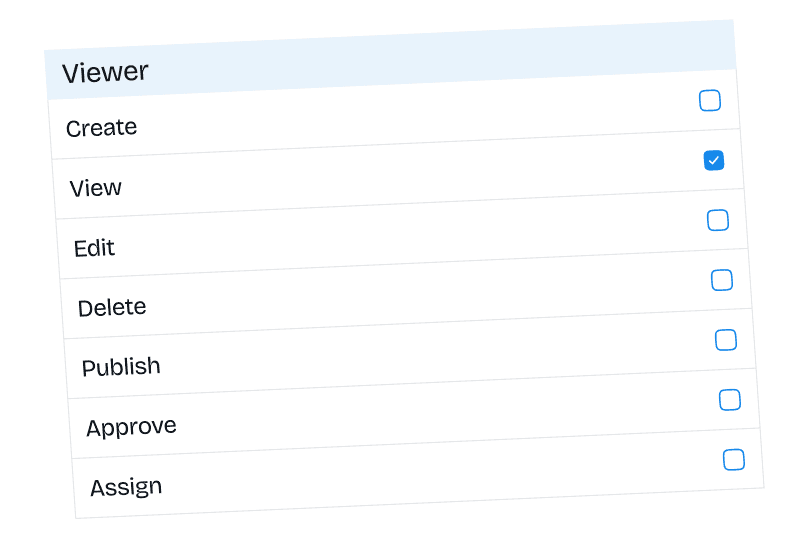
Viewer role
Read-only access to view and acknowledge documents. Complete assigned training, read policies, and access knowledge base without editing privileges.
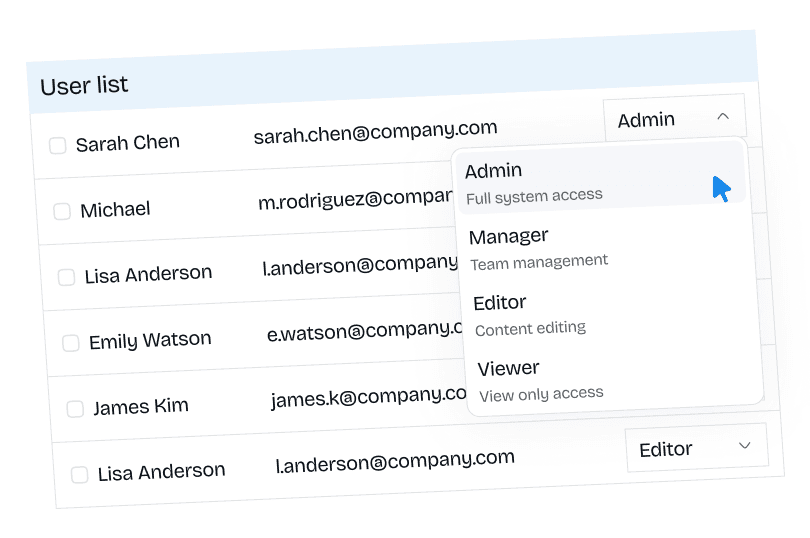
Role assignment
Assign roles during user creation or modify roles for existing users. Bulk role changes for efficient user management at scale.
Role-Based Permissions
Granular Document
Department-Based
Group-Based
Document and Folder Visibility
Approval Workflows and Authority
Inheritance and Hierarchy
External and Guest
Security and Audit
Four-tier role system
Clear hierarchy that covers most organizational needs without complexity. Admin, Manager, Editor, and Viewer roles with distinct capabilities.
Admin role
Complete control over the organization including user management, permission configuration, system settings, and all document operations. Full visibility across all content.
Manager role
Oversee content within their areas of responsibility. Assign documents, approve changes, manage team workflows, and access analytics. Cannot modify system-level settings.
Editor role
Create and edit content across document types with controlled publishing rights. Build documentation, training, and policies with appropriate oversight.
Viewer role
Read-only access to view and acknowledge documents. Complete assigned training, read policies, and access knowledge base without editing privileges.
Role assignment
Assign roles during user creation or modify roles for existing users. Bulk role changes for efficient user management at scale.
Role-Based Permissions
Granular Document
Department-Based
Group-Based
Document and Folder Visibility
Approval Workflows and Authority
Inheritance and Hierarchy
External and Guest
Security and Audit
Four-tier role system
Clear hierarchy that covers most organizational needs without complexity. Admin, Manager, Editor, and Viewer roles with distinct capabilities.
Admin role
Complete control over the organization including user management, permission configuration, system settings, and all document operations. Full visibility across all content.
Manager role
Oversee content within their areas of responsibility. Assign documents, approve changes, manage team workflows, and access analytics. Cannot modify system-level settings.
Editor role
Create and edit content across document types with controlled publishing rights. Build documentation, training, and policies with appropriate oversight.
Viewer role
Read-only access to view and acknowledge documents. Complete assigned training, read policies, and access knowledge base without editing privileges.
Role assignment
Assign roles during user creation or modify roles for existing users. Bulk role changes for efficient user management at scale.
Access control solutions by use case
Multi-department organizations
Different departments need access to different content. Finance shouldn't see HR personnel files. Engineering shouldn't access financial projections.
Challenge
Department-based permissions automatically grant appropriate access. HR department gets full control over HR documents. Finance controls financial content. Engineering manages technical documentation. Users in multiple departments get combined access from all memberships.
Solution
Multi-department organizations
Different departments need access to different content. Finance shouldn't see HR personnel files. Engineering shouldn't access financial projections.
Challenge
Department-based permissions automatically grant appropriate access. HR department gets full control over HR documents. Finance controls financial content. Engineering manages technical documentation. Users in multiple departments get combined access from all memberships.
Solution
Multi-department organizations
Different departments need access to different content. Finance shouldn't see HR personnel files. Engineering shouldn't access financial projections.
Challenge
Department-based permissions automatically grant appropriate access. HR department gets full control over HR documents. Finance controls financial content. Engineering manages technical documentation. Users in multiple departments get combined access from all memberships.
Solution
Cross-functional project teams
Project teams need access to documents across multiple departments. Product launch team needs sales materials, marketing content, and engineering specs.
Challenge
Create project-specific groups with members from different departments. Grant groups access to relevant content regardless of department. Expire group memberships when projects conclude.
Solution
Cross-functional project teams
Project teams need access to documents across multiple departments. Product launch team needs sales materials, marketing content, and engineering specs.
Challenge
Create project-specific groups with members from different departments. Grant groups access to relevant content regardless of department. Expire group memberships when projects conclude.
Solution
Cross-functional project teams
Project teams need access to documents across multiple departments. Product launch team needs sales materials, marketing content, and engineering specs.
Challenge
Create project-specific groups with members from different departments. Grant groups access to relevant content regardless of department. Expire group memberships when projects conclude.
Solution
Executive and leadership content
Strategic plans, financial projections, and executive communications need restricted access. Only leadership should view certain content.
Challenge
Job title-based restrictions limit documents to executives and senior leadership. Role-based controls ensure only admins and managers see leadership content. Folder-level restrictions protect entire leadership knowledge areas.
Solution
Executive and leadership content
Strategic plans, financial projections, and executive communications need restricted access. Only leadership should view certain content.
Challenge
Job title-based restrictions limit documents to executives and senior leadership. Role-based controls ensure only admins and managers see leadership content. Folder-level restrictions protect entire leadership knowledge areas.
Solution
Executive and leadership content
Strategic plans, financial projections, and executive communications need restricted access. Only leadership should view certain content.
Challenge
Job title-based restrictions limit documents to executives and senior leadership. Role-based controls ensure only admins and managers see leadership content. Folder-level restrictions protect entire leadership knowledge areas.
Solution
Compliance and regulatory requirements
Sensitive compliance documents require controlled access with complete audit trails. Prove who accessed what during audits.
Challenge
Granular permissions restrict compliance documents to relevant teams. Approval workflows ensure proper review. Complete access logs document every interaction. Export audit reports for regulatory submissions.
Solution
Compliance and regulatory requirements
Sensitive compliance documents require controlled access with complete audit trails. Prove who accessed what during audits.
Challenge
Granular permissions restrict compliance documents to relevant teams. Approval workflows ensure proper review. Complete access logs document every interaction. Export audit reports for regulatory submissions.
Solution
Compliance and regulatory requirements
Sensitive compliance documents require controlled access with complete audit trails. Prove who accessed what during audits.
Challenge
Granular permissions restrict compliance documents to relevant teams. Approval workflows ensure proper review. Complete access logs document every interaction. Export audit reports for regulatory submissions.
Solution
External partner collaboration
Share specific documents with vendors, contractors, or partners without giving them full system access or exposing internal content.
Challenge
External sharing generates secure, unique URLs for specific documents. Partners view content without accounts. Time-limited access ensures links expire after projects conclude. Revoke access immediately if needed.
Solution
External partner collaboration
Share specific documents with vendors, contractors, or partners without giving them full system access or exposing internal content.
Challenge
External sharing generates secure, unique URLs for specific documents. Partners view content without accounts. Time-limited access ensures links expire after projects conclude. Revoke access immediately if needed.
Solution
External partner collaboration
Share specific documents with vendors, contractors, or partners without giving them full system access or exposing internal content.
Challenge
External sharing generates secure, unique URLs for specific documents. Partners view content without accounts. Time-limited access ensures links expire after projects conclude. Revoke access immediately if needed.
Solution
Training and onboarding access
New employees need access to onboarding materials and training content but shouldn't see everything immediately. Progressive access as they advance.
Challenge
Group-based permissions for onboarding cohorts. Assign new hires to onboarding group with access to introductory content. Promote to department groups as they progress. Training visibility follows their advancement.
Solution
Training and onboarding access
New employees need access to onboarding materials and training content but shouldn't see everything immediately. Progressive access as they advance.
Challenge
Group-based permissions for onboarding cohorts. Assign new hires to onboarding group with access to introductory content. Promote to department groups as they progress. Training visibility follows their advancement.
Solution
Training and onboarding access
New employees need access to onboarding materials and training content but shouldn't see everything immediately. Progressive access as they advance.
Challenge
Group-based permissions for onboarding cohorts. Assign new hires to onboarding group with access to introductory content. Promote to department groups as they progress. Training visibility follows their advancement.
Solution
Temporary committees and working groups
Create temporary teams with specific access that expires when work concludes. Don't manually revoke access later.
Challenge
Groups with expiring memberships automatically remove access on specific dates. Compliance committee active for audit season then expires. Working groups for specific initiatives with built-in access termination.
Solution
Temporary committees and working groups
Create temporary teams with specific access that expires when work concludes. Don't manually revoke access later.
Challenge
Groups with expiring memberships automatically remove access on specific dates. Compliance committee active for audit season then expires. Working groups for specific initiatives with built-in access termination.
Solution
Temporary committees and working groups
Create temporary teams with specific access that expires when work concludes. Don't manually revoke access later.
Challenge
Groups with expiring memberships automatically remove access on specific dates. Compliance committee active for audit season then expires. Working groups for specific initiatives with built-in access termination.
Solution
Franchise or multi-location organizations
Each location needs access to corporate materials plus location-specific content. Prevent locations from seeing each other's documents.
Challenge
Department structure for each location. Corporate folder visible to all departments. Location-specific folders restricted to respective departments. Franchise owners see their location plus corporate materials.
Solution
Franchise or multi-location organizations
Each location needs access to corporate materials plus location-specific content. Prevent locations from seeing each other's documents.
Challenge
Department structure for each location. Corporate folder visible to all departments. Location-specific folders restricted to respective departments. Franchise owners see their location plus corporate materials.
Solution
Permission management features
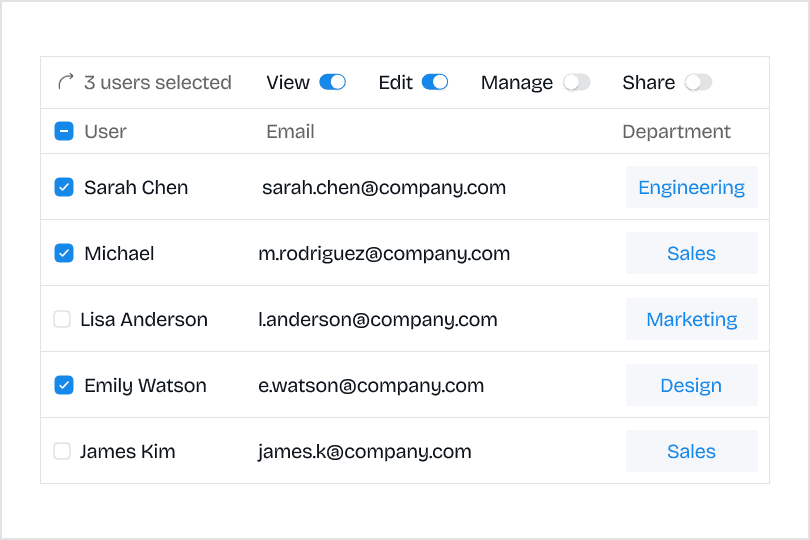
Bulk permission changes
Modify permissions for multiple users simultaneously. Efficient management when organizational changes affect many people.
Bulk permission changes
Modify permissions for multiple users simultaneously. Efficient management when organizational changes affect many.
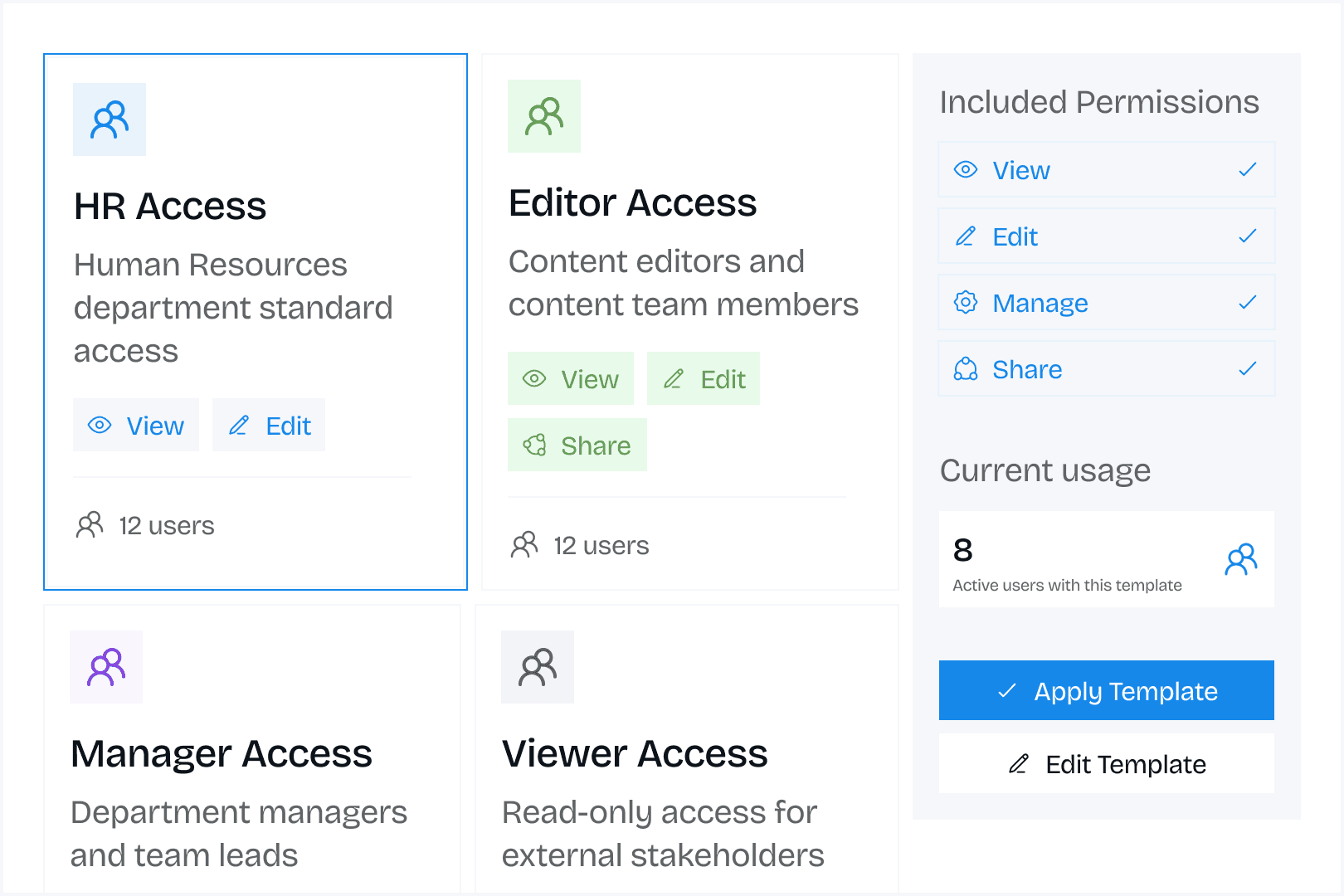
Permission templates
Save permission configurations for reuse. Apply standard permission sets to new departments or groups quickly.
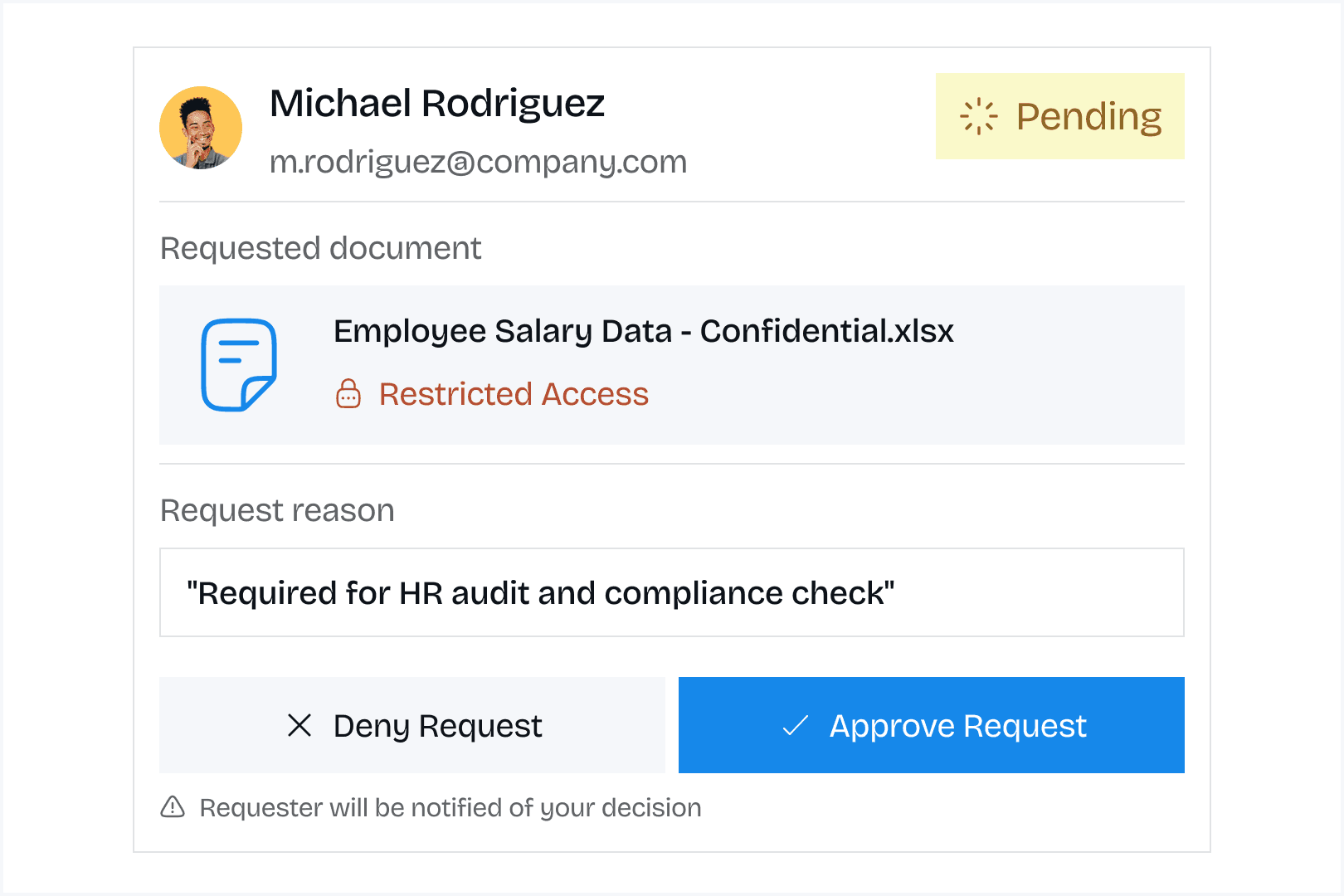
Access request workflows
Users request access to restricted documents. Approvers grant or deny requests with notification trails.
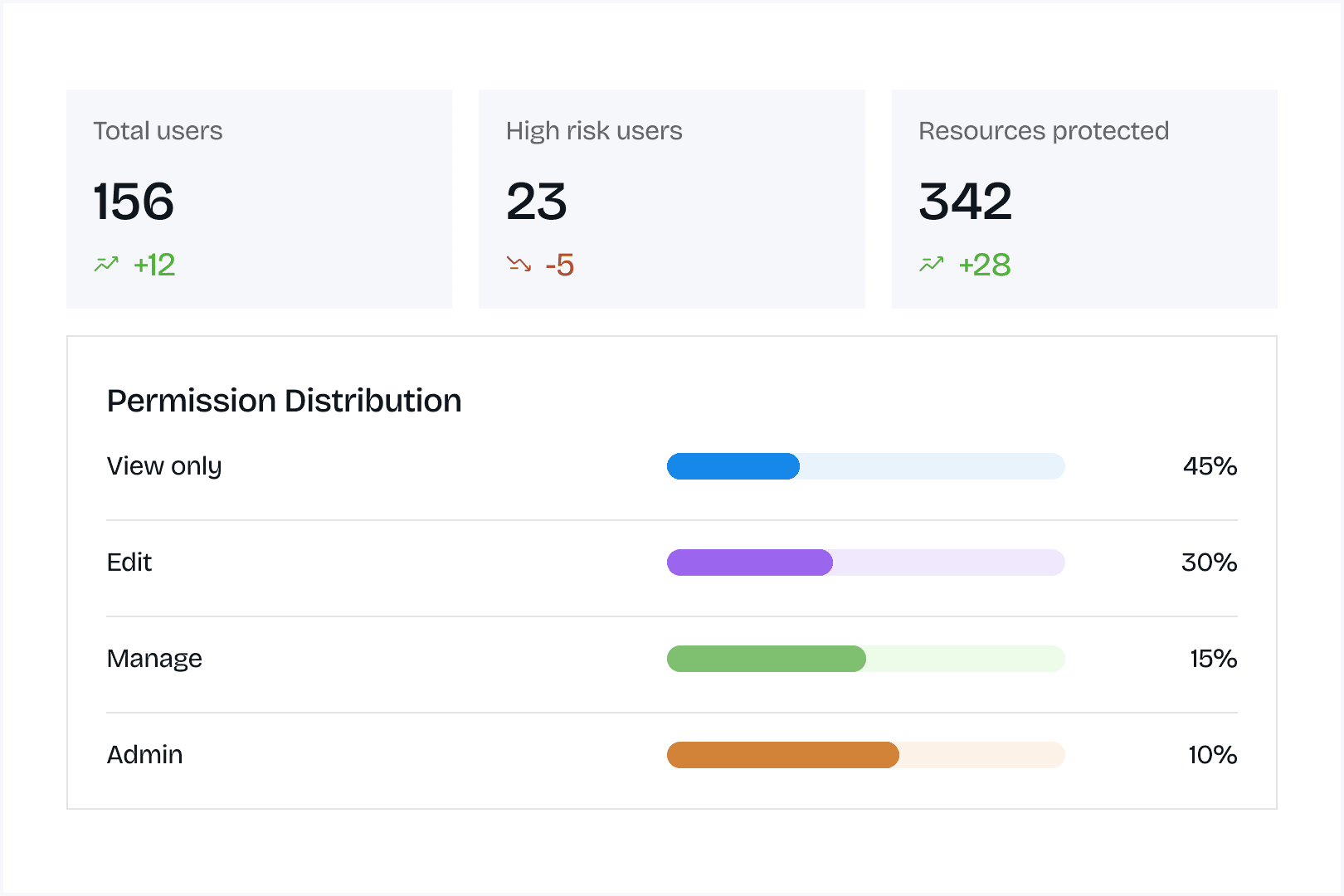
Permission reporting
Generate reports showing who has access to what. Audit permission structures and identify overly broad or overly restrictive access.
User access summary
See all documents and folders a specific user can access. Useful during offboarding or role changes.
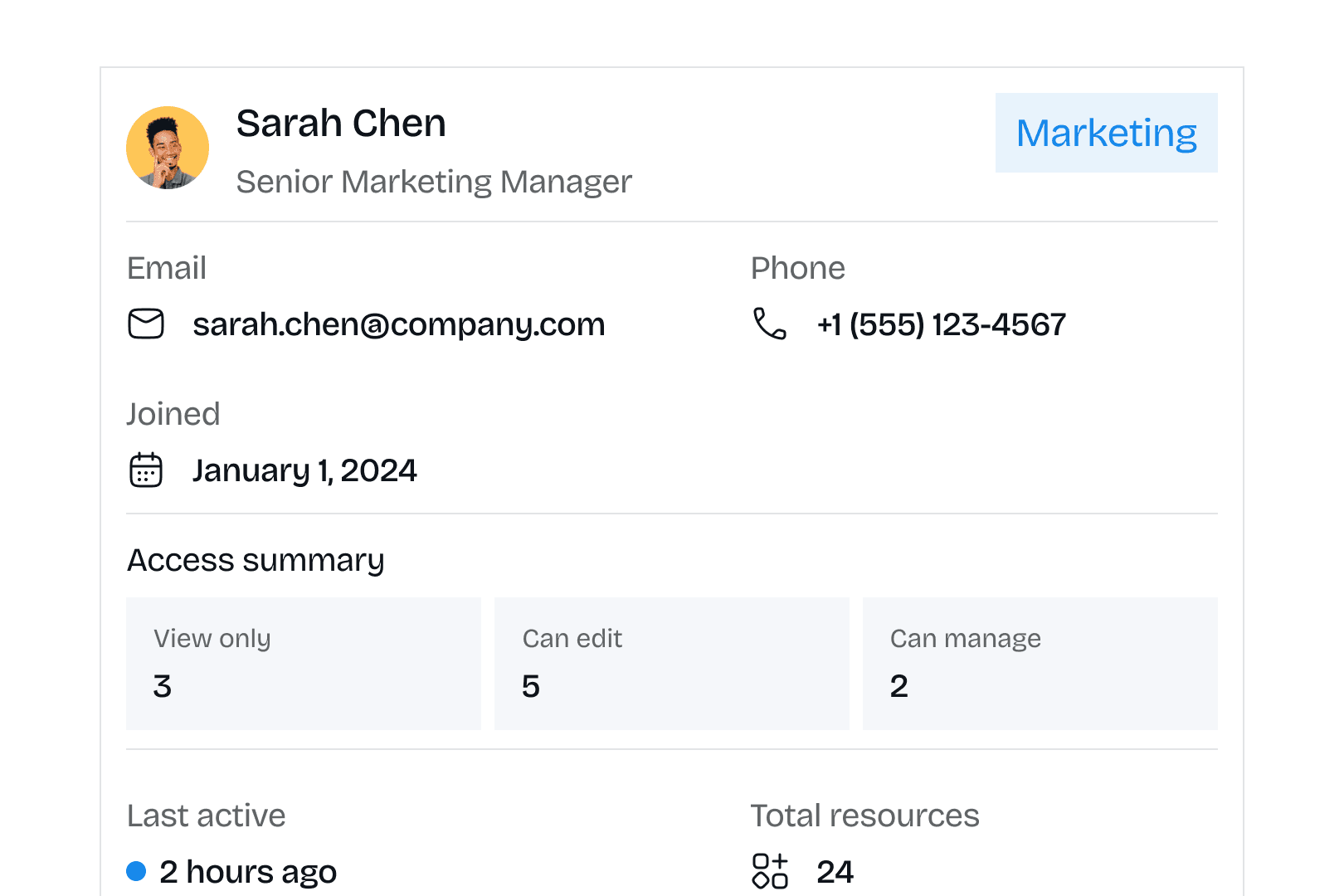
User access summary
See all documents and folders a specific user can access. Useful during offboarding or role changes.
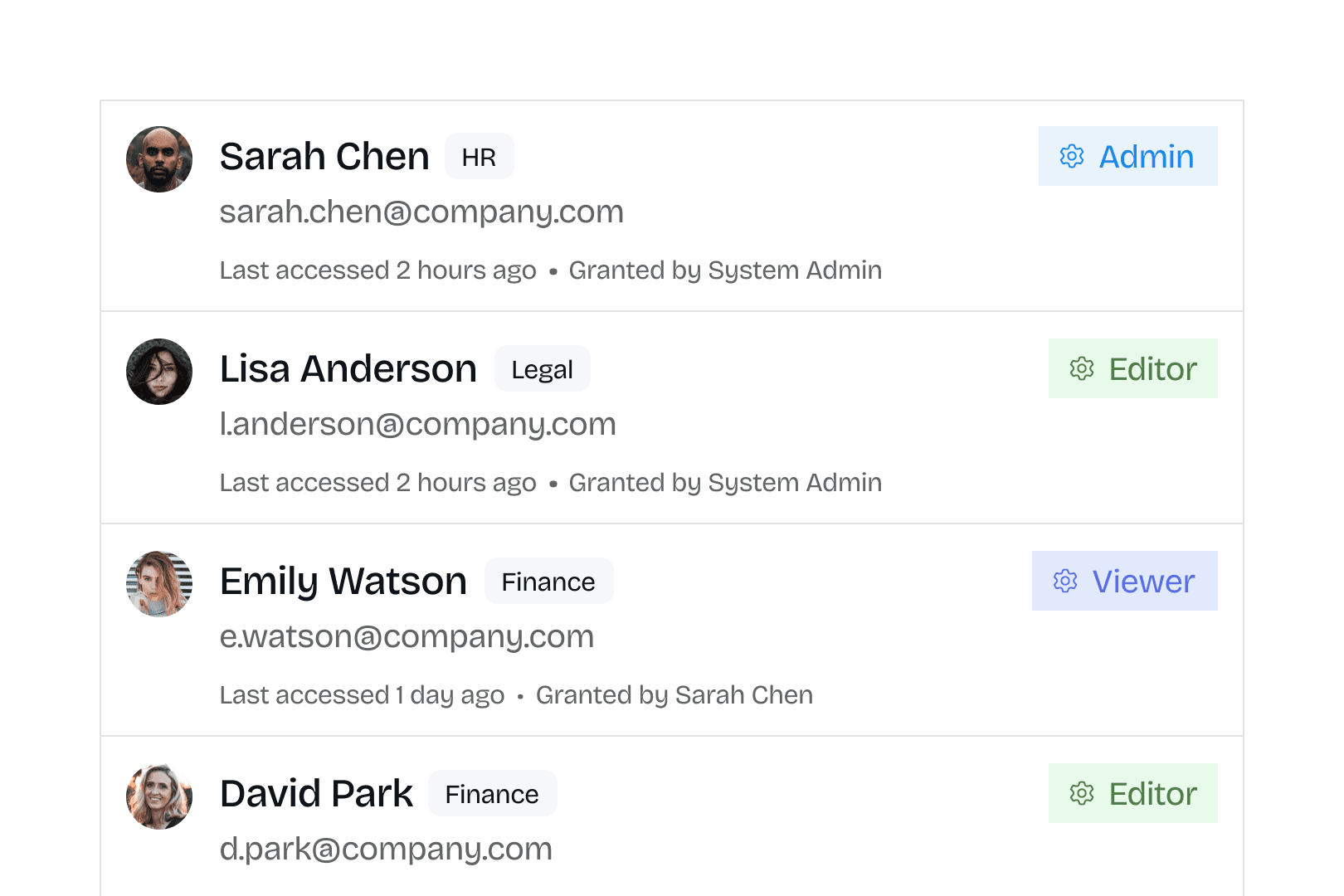
Document access list
View all users who can access specific documents. Identify who has visibility into sensitive content.
Document access list
View all users who can access specific documents. Identify who has visibility into sensitive content.
Why organizations choose BlueDocs access control
Why organizations choose BlueDocs access control
BlueDocs helps organizations turn scattered information into a connected, searchable source of truth for every team.
BlueDocs helps organizations turn scattered information into a connected, searchable source of truth for every team.
" height="29px" id="job_sc0Hq" width="29px"/><path d="M 3.021 0 C 1.352 0 0 1.352 0 3.021 C 0 4.139 0.607 5.115 1.51 5.638 L 1.51 9.572 C 1.51 10.066 1.51 10.313 1.602 10.535 C 1.694 10.757 1.869 10.931 2.218 11.281 L 3.021 12.083 L 4.295 10.81 C 4.353 10.751 4.383 10.721 4.407 10.69 C 4.471 10.606 4.512 10.507 4.526 10.403 C 4.531 10.363 4.531 10.321 4.531 10.238 C 4.531 10.171 4.531 10.137 4.528 10.105 C 4.518 10.019 4.491 9.936 4.447 9.862 C 4.43 9.834 4.41 9.807 4.37 9.753 L 3.625 8.76 L 4.048 8.197 C 4.287 7.877 4.407 7.717 4.469 7.531 C 4.531 7.345 4.531 7.146 4.531 6.747 L 4.531 5.638 C 5.434 5.115 6.042 4.139 6.042 3.021 C 6.042 1.352 4.689 0 3.021 0 Z" fill="transparent" height="12.083333333333332px" id="X_aUHhE3w" stroke-dasharray="" stroke-linecap="butt" stroke-linejoin="round" stroke-width="0.91" stroke="rgb(255, 255, 255)" transform="translate(8.458 8.458)" width="6.041666666666668px"/><path d="M 0 0 L 0.005 0" fill="transparent" height="1px" id="F6dJpf3Uf" stroke-dasharray="" stroke-linecap="round" stroke-linejoin="round" stroke-width="1.21" stroke="rgb(255, 255, 255)" transform="translate(11.479 11.479)" width="1px"/><path d="M 0 0 L 3.625 0 C 4.188 0 4.47 0 4.692 0.092 C 4.988 0.215 5.223 0.45 5.346 0.746 C 5.438 0.968 5.437 1.249 5.437 1.813 C 5.437 2.376 5.438 2.657 5.346 2.879 C 5.223 3.175 4.988 3.41 4.692 3.533 C 4.47 3.625 4.188 3.625 3.625 3.625 L 0 3.625" fill="transparent" height="3.625px" id="j6qsQDVVG" stroke-dasharray="" stroke-linecap="round" stroke-linejoin="miter" stroke-miterlimit="10" stroke-width="0.91" stroke="rgb(255, 255, 255)" transform="translate(15.104 15.708)" width="5.437499999999998px"/><path d="M 0 0 L 2.417 0 C 2.98 0 3.261 0 3.483 0.092 C 3.779 0.215 4.015 0.45 4.137 0.746 C 4.229 0.968 4.229 1.249 4.229 1.813 C 4.229 2.376 4.229 2.657 4.137 2.879 C 4.015 3.175 3.779 3.41 3.483 3.533 C 3.261 3.625 2.98 3.625 2.417 3.625 L 0 3.625" fill="transparent" height="3.625px" id="T27HETN_n" stroke-dasharray="" stroke-linecap="round" stroke-linejoin="miter" stroke-miterlimit="10" stroke-width="0.91" stroke="rgb(255, 255, 255)" transform="translate(16.313 10.271)" width="4.229166666666664px"/></svg>)
Balance security and collaboration
Protect sensitive content while enabling teams to collaborate effectively. Security that doesn't block legitimate work.
Balance security and collaboration
Protect sensitive content while enabling teams to collaborate effectively. Security that doesn't block legitimate work.
Balance security and collaboration
Protect sensitive content while enabling teams to collaborate effectively. Security that doesn't block legitimate work.
" height="29px" id="VGlyNMcFW" width="29px"/><path d="M 9.667 5.438 L 9.667 4.833 C 9.667 2.555 9.667 1.416 8.959 0.708 C 8.251 0 7.112 0 4.833 0 C 2.555 0 1.416 0 0.708 0.708 C 0 1.416 0 2.555 0 4.833 L 0 7.25 C 0 9.528 0 10.668 0.708 11.375 C 1.416 12.083 2.555 12.083 4.833 12.083" fill="transparent" height="12.083333333333332px" id="O49zbgniw" stroke-dasharray="" stroke-linecap="round" stroke-linejoin="round" stroke-width="0.91" stroke="rgb(255, 255, 255)" transform="translate(9.063 8.458)" width="9.666666666666664px"/><path d="M 4.834 4.798 L 3.798 3.762 M 4.143 2.036 C 4.156 2.785 3.764 3.482 3.118 3.86 C 2.472 4.238 1.672 4.238 1.026 3.86 C 0.38 3.482 -0.012 2.785 0 2.036 C 0.02 0.906 0.941 0 2.072 0 C 3.202 0 4.124 0.906 4.143 2.036 Z" fill="transparent" height="4.797955645243327px" id="ZmL7ymaeb" stroke-dasharray="" stroke-linecap="round" stroke-linejoin="miter" stroke-miterlimit="10" stroke-width="0.91" stroke="rgb(255, 255, 255)" transform="translate(15.104 15.708)" width="4.8336373697916315px"/><path d="M 0 0 L 4.833 0 M 0 2.417 L 2.417 2.417" fill="transparent" height="2.416666030883789px" id="wfvyBvcas" stroke-dasharray="" stroke-linecap="round" stroke-linejoin="round" stroke-width="0.91" stroke="rgb(255, 255, 255)" transform="translate(11.479 11.479)" width="4.833333333333334px"/></g></svg>)
Scalable permission management
Manage permissions for 20 users or 2,000 users with the same ease. Structure scales from simple to complex without breaking.
Scalable permission management
Manage permissions for 20 users or 2,000 users with the same ease. Structure scales from simple to complex without breaking.
Scalable permission management
Manage permissions for 20 users or 2,000 users with the same ease. Structure scales from simple to complex without breaking.
Scalable permission management
Manage permissions for 20 users or 2,000 users with the same ease. Structure scales from simple to complex without breaking.
" height="29px" id="uipreh33B" width="29px"/><path d="M 6.042 3.021 C 6.042 1.352 4.689 0 3.021 0 C 1.352 0 0 1.352 0 3.021 C 0 4.689 1.352 6.042 3.021 6.042 C 4.689 6.042 6.042 4.689 6.042 3.021 Z" fill="transparent" height="6.041666666666666px" id="W0M0DiIel" stroke-dasharray="" stroke-linecap="round" stroke-linejoin="round" stroke-width="0.91" stroke="rgb(255, 255, 255)" transform="translate(9.667 9.365)" width="6.041666666666666px"/><path d="M 8.458 6.344 C 8.458 4.008 6.565 2.115 4.229 2.115 C 1.893 2.115 0 4.008 0 6.344 M 9.063 0 L 12.083 0 M 9.063 1.813 L 12.083 1.813 M 10.875 3.625 L 12.083 3.625" fill="transparent" height="6.343750635782877px" id="s2mtGsXTo" stroke-dasharray="" stroke-linecap="round" stroke-linejoin="round" stroke-width="0.91" stroke="rgb(255, 255, 255)" transform="translate(8.458 13.292)" width="12.08333381017049px"/></g></svg>)
Compliance confidence
Complete audit trails prove access control for regulatory requirements. Document who accessed what for compliance reviews.
Compliance confidence
Complete audit trails prove access control for regulatory requirements. Document who accessed what for compliance reviews.
Compliance confidence
Complete audit trails prove access control for regulatory requirements. Document who accessed what for compliance reviews.
Audit-Ready documentation
Generate access reports and permission histories instantly. Respond to audit requests in minutes instead of days.
Audit-Ready documentation
Generate access reports and permission histories instantly. Respond to audit requests in minutes instead of days.
Audit-Ready documentation
Generate access reports and permission histories instantly. Respond to audit requests in minutes instead of days.
Security without complexity
Enterprise-grade security with intuitive configuration. Protect sensitive information without requiring security expertise.
Security without complexity
Enterprise-grade security with intuitive configuration. Protect sensitive information without requiring security expertise.
Security without complexity
Enterprise-grade security with intuitive configuration. Protect sensitive information without requiring security expertise.
" height="29px" id="Y6ajLuBeP" width="29px"/><path d="M 0 0 L 6.042 0 M 0 3.625 L 6.042 3.625 M 0 7.25 L 6.042 7.25" fill="transparent" height="7.25px" id="QKQxv3N9o" stroke-dasharray="" stroke-linecap="round" stroke-linejoin="miter" stroke-miterlimit="10" stroke-width="0.91" stroke="rgb(255, 255, 255)" transform="translate(13.896 10.875)" width="6.041666666666668px"/><path d="M 0 2.05 C 0 2.05 0.604 2.444 0.906 3.021 C 0.906 3.021 1.812 0.755 3.021 0 M 0 8.696 C 0 8.696 0.604 9.09 0.906 9.667 C 0.906 9.667 1.812 7.401 3.021 6.646" fill="transparent" height="9.666666348775227px" id="ASjrOK57C" stroke-dasharray="" stroke-linecap="round" stroke-linejoin="round" stroke-width="0.91" stroke="rgb(255, 255, 255)" transform="translate(9.063 9.667)" width="3.020833333333332px"/></g></svg>)
Reduced administrative burden
Department and group-based permissions automate access management. Users automatically get appropriate access based on organizational position.
Reduced administrative burden
Department and group-based permissions automate access management. Users automatically get appropriate access based on organizational position.
Reduced administrative burden
Department and group-based permissions automate access management. Users automatically get appropriate access based on organizational position.
" height="29px" id="iSjS6MYBA" width="29px"/><path d="M 0.973 3.42 L 0.302 6.042 L 1.813 5.438 L 3.323 6.042 L 2.719 3.383 M 3.625 1.813 C 3.625 2.814 2.814 3.625 1.813 3.625 C 0.811 3.625 0 2.814 0 1.813 C 0 0.811 0.811 0 1.813 0 C 2.814 0 3.625 0.811 3.625 1.813 Z" fill="transparent" height="6.041666553497315px" id="bku_Kpbbm" stroke-dasharray="" stroke-linecap="round" stroke-linejoin="round" stroke-width="0.91" stroke="rgb(255, 255, 255)" transform="translate(16.313 14.5)" width="3.625px"/><path d="M 10.271 4.833 C 10.271 2.555 10.271 1.416 9.563 0.708 C 8.855 0 7.716 0 5.438 0 L 4.833 0 C 2.555 0 1.416 0 0.708 0.708 C 0 1.416 0 2.555 0 4.833 L 0 7.25 C 0 9.528 0 10.668 0.708 11.375 C 1.416 12.083 2.555 12.083 4.833 12.083 L 6.042 12.083 M 2.719 3.021 L 7.552 3.021 M 2.719 6.042 L 5.438 6.042" fill="transparent" height="12.083333333333332px" id="eUH9sPAVr" stroke-dasharray="" stroke-linecap="round" stroke-linejoin="round" stroke-width="0.91" stroke="rgb(255, 255, 255)" transform="translate(9.063 8.458)" width="10.270833333333332px"/></g></svg>)
Flexible for organizational change
Adapt permissions as your organization evolves. New departments, changing teams, and reorganizations handled without permission chaos.
Flexible for organizational change
Adapt permissions as your organization evolves. New departments, changing teams, and reorganizations handled without permission chaos.
Flexible for organizational change
Adapt permissions as your organization evolves. New departments, changing teams, and reorganizations handled without permission chaos.
Customer success story
Customer success story
Hear how businesses like yours accelerated growth, optimized workflows, and delivered measurable outcomes through our custom AI solutions.
Hear how businesses like yours accelerated growth, optimized workflows, and delivered measurable outcomes through our custom AI solutions.
A 500-person financial services firm needed strict access controls for regulatory compliance. Different departments handled client data, financial projections, and compliance documentation. External auditors required proof of access controls and complete logs of who accessed sensitive documents. Their previous system used shared folders with minimal access control. During audits, they couldn't prove who had accessed compliance documents.
A 500-person financial services firm needed strict access controls for regulatory compliance. Different departments handled client data, financial projections, and compliance documentation. External auditors required proof of access controls and complete logs of who accessed sensitive documents. Their previous system used shared folders with minimal access control. During audits, they couldn't prove who had accessed compliance documents.
They implemented BlueDocs with department-based permissions and role-based access control. Finance department got exclusive access to financial projections. Compliance team controlled regulatory documentation. Customer service accessed client-facing materials only. They created approval workflows requiring compliance team sign-off on all policy changes.
They implemented BlueDocs with department-based permissions and role-based access control. Finance department got exclusive access to financial projections. Compliance team controlled regulatory documentation. Customer service accessed client-facing materials only. They created approval workflows requiring compliance team sign-off on all policy changes.
During their next regulatory audit, they generated complete access logs in under 5 minutes showing exactly who accessed each compliance document and when. The auditor praised their access control structure. They eliminated three security findings from previous audits related to inadequate access controls. Permission management time decreased by 60% because department-based permissions automated access assignment. When they onboarded 30 new employees during expansion, appropriate access was granted automatically based on department assignment.
During their next regulatory audit, they generated complete access logs in under 5 minutes showing exactly who accessed each compliance document and when. The auditor praised their access control structure. They eliminated three security findings from previous audits related to inadequate access controls. Permission management time decreased by 60% because department-based permissions automated access assignment. When they onboarded 30 new employees during expansion, appropriate access was granted automatically based on department assignment.
“ Their Chief Information Security Officer said the transformation came from moving from ad-hoc access controls to systematic permission management with complete accountability. “
“ Their Chief Information Security Officer said the transformation came from moving from ad-hoc access controls to systematic permission management with complete accountability. “

Sarah Chen
Head of Customer Success
Get Started With BlueDocs Collaboration Tools
Transform document chaos into organized, engaging knowledge experiences.
Free 7-day trial
No credit card required. Full access to all training and onboarding features.
See it in action
Book a personalized demo focused on your onboarding and training needs.
Questions?
Talk to our team about automating your employee training and onboarding.

Product
Compare
Subscribe
Join our community to receive updates
By subscribing, you agree to our Privacy Policy

" height="29px" id="HpoDilQXr" width="29px"/><path d="M 0 0 L 0 10.684 M 6.105 4.579 L 6.105 10.684 M 6.105 4.579 C 6.105 2.05 8.155 0 10.684 0 C 13.213 0 15.263 2.05 15.263 4.579 L 15.263 10.684 M 6.105 4.579 L 6.105 0" fill="transparent" height="10.68421052631579px" id="RHyMZG0zD" stroke-dasharray="" stroke-linecap="round" stroke-linejoin="round" stroke-width="2.29" stroke="rgb(255, 255, 255)" transform="translate(6.868 11.447)" width="15.263157970026917px"/><path d="M 0.014 0 L 0 0" fill="transparent" height="1px" id="AeX1Dw3MI" stroke-dasharray="" stroke-linecap="round" stroke-linejoin="round" stroke-width="3.05" stroke="rgb(255, 255, 255)" transform="translate(6.868 6.868)" width="1px"/></g></svg>)
" height="29px" id="XCYDVGb_3" width="29px"/><path d="M 0 15.263 L 6.401 8.862 M 6.401 8.862 L 0 0 L 4.24 0 L 8.862 6.401 M 6.401 8.862 L 11.023 15.263 L 15.263 15.263 L 8.862 6.401 M 15.263 0 L 8.862 6.401" fill="transparent" height="15.26315860125893px" id="yHn1Yx9Mu" stroke-dasharray="" stroke-linecap="round" stroke-linejoin="round" stroke-width="2.29" stroke="rgb(255, 255, 255)" transform="translate(6.868 6.868)" width="15.26315860125887px"/></g></svg>)
" height="29px" id="yIfVOFQtI" width="29px"/><path d="M 10.448 0 L 5.953 0 C 4.359 0 3.064 1.285 3.053 2.879 L 2.921 20.454 M 0 9.121 L 7.331 9.121" fill="transparent" height="20.45415789582844px" id="GiChiTJAr" stroke-dasharray="" stroke-linecap="round" stroke-linejoin="round" stroke-width="2.29" stroke="rgb(255, 255, 255)" transform="translate(11.447 8.395)" width="10.447631995251367px"/></g></svg>)
" height="29px" id="Qh1IiqaXA" width="29px"/><path d="M 13.737 6.868 C 13.737 10.662 10.662 13.737 6.868 13.737 C 3.075 13.737 0 10.662 0 6.868 C 0 3.075 3.075 0 6.868 0 C 10.662 0 13.737 3.075 13.737 6.868 Z" fill="transparent" height="13.736842105263158px" id="pIfl6CNpA" stroke-dasharray="" stroke-linecap="butt" stroke-linejoin="miter" stroke-miterlimit="10" stroke-width="2.29" stroke="rgb(255, 255, 255)" transform="translate(7.632 7.632)" width="13.736842105263158px"/><path d="M 0.015 0 L 0 0" fill="transparent" height="1px" id="iMbHyTc64" stroke-dasharray="" stroke-linecap="round" stroke-linejoin="round" stroke-width="3.05" stroke="rgb(255, 255, 255)" transform="translate(22.895 6.105)" width="1px"/></g></svg>)
" width="29px"><path d="M 14.5 24.65 C 17.124 24.65 19.64 24.391 21.972 23.915 C 24.886 23.32 26.342 23.025 27.67 21.317 C 29 19.607 29 17.645 29 13.721 L 29 10.929 C 29 7.005 29 5.042 27.67 3.334 C 26.342 1.626 24.886 1.328 21.972 0.735 C 19.512 0.241 17.009 -0.005 14.5 0 C 11.876 0 9.36 0.26 7.028 0.735 C 4.114 1.33 2.658 1.626 1.33 3.334 C 0 5.043 0 7.005 0 10.927 L 0 13.723 C 0 17.645 0 19.607 1.33 21.317 C 2.658 23.025 4.114 23.322 7.028 23.915 C 9.36 24.391 11.876 24.65 14.5 24.65 Z" fill="rgb(98, 100, 102)" height="24.650083927490723px" id="cNFz0c6MM" transform="translate(0 0)" width="29px"/><path d="M 10.095 5.529 C 9.88 6.407 8.735 7.037 6.445 8.3 C 3.954 9.673 2.709 10.359 1.701 10.093 C 1.365 10.007 1.051 9.85 0.78 9.634 C 0 9.003 0 7.693 0 5.075 C 0 2.456 0 1.147 0.78 0.516 C 1.044 0.303 1.36 0.145 1.701 0.056 C 2.709 -0.209 3.954 0.477 6.445 1.85 C 8.736 3.111 9.88 3.742 10.095 4.621 C 10.167 4.92 10.167 5.23 10.095 5.529 Z" fill="transparent" height="10.149409924588017px" id="obhAcineG" stroke-dasharray="" stroke-linecap="butt" stroke-linejoin="round" stroke-width="2.17" stroke="rgb(255, 255, 255)" transform="translate(10.15 7.25)" width="10.149275000000182px"/></g></svg>)
Product
Compare
Subscribe
Join our community to receive updates
By subscribing, you agree to our Privacy Policy
Product
Compare
Subscribe
Join our community to receive updates
By subscribing, you agree to our Privacy Policy
Product
Compare
Subscribe
Join our community to receive updates
By subscribing, you agree to our Privacy Policy